Run multiple Roblox clients. Side by side, one machine.
RORORO is a native multi-launcher for Roblox — spawn several clients at once, each signed in as a different saved account, one click each. Native on Windows and macOS, plugin-extensible, free. No injection, no client modification — it holds a singleton lock before launch and starts the official client unmodified.
Get it
Three install paths. Pick the trust posture that fits you — they all land the same app.
Microsoft Store
Signed by Microsoft, bypasses SmartScreen entirely, auto-updates through the Store. One click and you are in — the best path for most people.
Open the Store listingGitHub Releases
Grab rororo-win-Setup.exe — one click, installs to your user profile. SmartScreen warns once because the installer is unsigned; choose More info → Run anyway. Velopack auto-updates it from there.
Homebrew
The Mac-native sibling — signed and notarized by Apple, Sparkle auto-update. Install with one tap:
brew tap estevanhernandez-stack-ed/rororo
brew install --cask rororo
RORORO Mac on GitHub
What it does
The launcher core is the same shape on both platforms — the deep roster tooling below it ships Windows-first.
One-click multi-instance
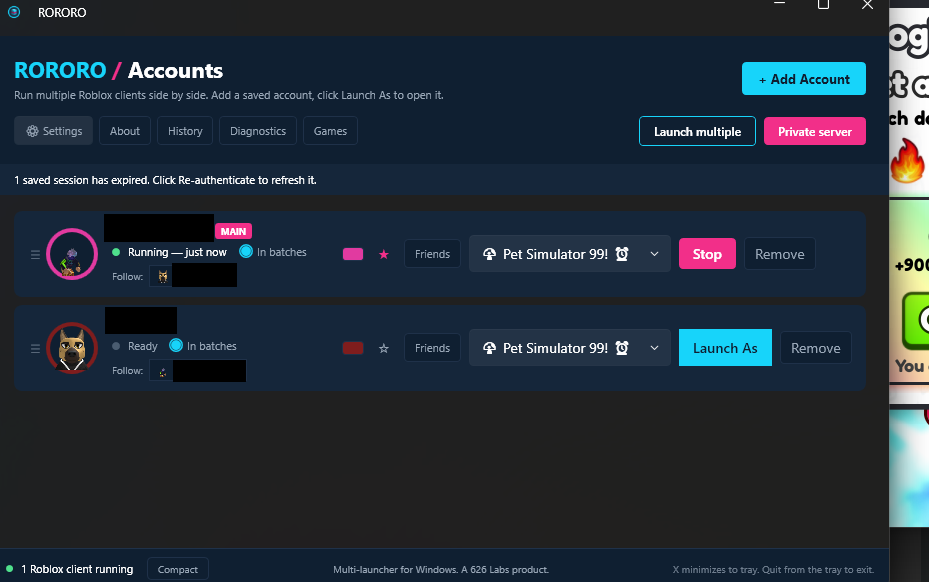
A tray toggle holds the Roblox singleton lock so multiple clients run side by side. The official client, unmodified — no injection, no DevTools, no registry edits. The tray ring reads at a glance: cyan on, slate off, magenta error.
Saved-account vault
Add your alts once via an embedded login window. Cookies are encrypted at rest and tied to your machine — DPAPI on Windows, Keychain on macOS — with a passphrase-encrypted export when you move PCs.
Launch As
One click spawns each saved account straight into your default game, a saved private server, or any pasted share link. Set it once; every alt lands where you pointed it.
Your password never touches the app
Login happens on Roblox's own page inside an embedded browser. RORORO is the window frame, not the form handler — it only ever captures the session cookie set after a successful login.
Whole squad, one server
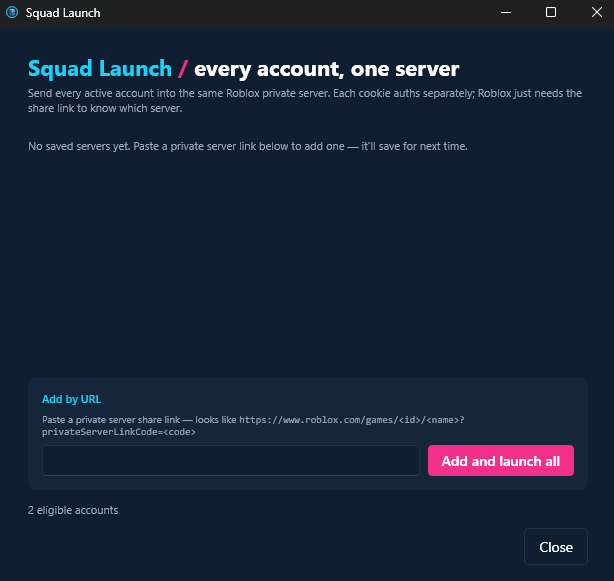
Send a set of accounts into the same private server in three trust-aware phases — direct joins, an anchor, then followers. Careful mode waits for each alt to land before sending the next. An alt set to Join via friend follows your main on every launch, and when your main isn't in a game RORORO asks instead of joining direct.
Follow a friend in
Pick any friend of your main account — not just your saved alts — and launch straight into their server. If they aren't joinable, RORORO says so instead of bouncing.
A library for games and servers
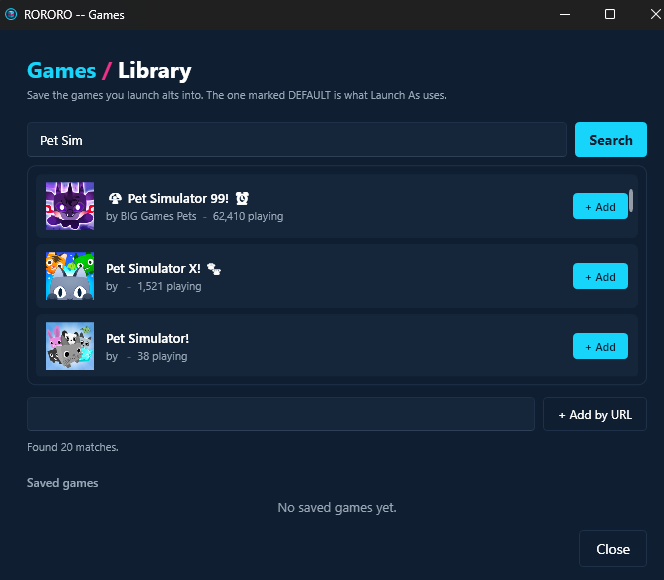
Keep saved games and private servers, set defaults, and route different alts into different servers in one batch. Local renames and tags keep a deep roster legible — Roblox-side names untouched.
Live roster status
Every row shows the real game it's in — "In Pet Sim 99", "At Roblox home" — plus an idle chip that turns amber when an alt has sat too long. One tray ping; the threshold is yours.
Stream without leaking your alts
One flip disguises the whole roster — stand-in names and hand-drawn avatars across every row, banner, modal, and Roblox window title. Private-server links hide behind a reveal-only pill. Disguises persist across restarts.
Per-account FPS caps
Cap each alt's FPS from its row before launch — farm accounts low, your main uncapped. Plays nice with Bloxstrap and warns when the two would fight.
Consent-gated plugins
Extend RORORO with out-of-process plugins — separate signed apps behind a per-capability consent sheet, SHA-verified at install. The Ur family (Task, OCR, AFK) is live on the marketplace.
Auto-update built in
Velopack on Windows, Sparkle on macOS. When Roblox shifts under the launcher, the fix ships to you without a reinstall — the compat config even updates remotely, no new binary needed.
Memory watchdog + Recycle
The Roblox client eats more RAM the longer it runs — enough clients will eventually fill your PC. RORORO learns what each client really costs on your machine, warns before you run out, and one click puts a heavy alt right back into its server.
Alerts wherever you are
Route any alert to the desktop, a Discord webhook you create, or your phone through Pushover or ntfy — in any mix per alert. Drops, memory warnings, recycle completions, and an every-two-hours all-good mark while your accounts run, so silence itself becomes the warning.
RORORO keeps score
History opens with your stats — the most alts you've ever run at once, total hours, longest session — plus per-alt login streaks that only count days the alt actually landed in a game.
Themes, yours to build
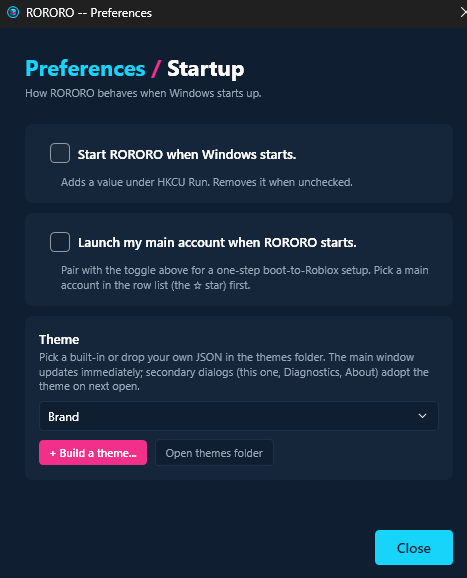
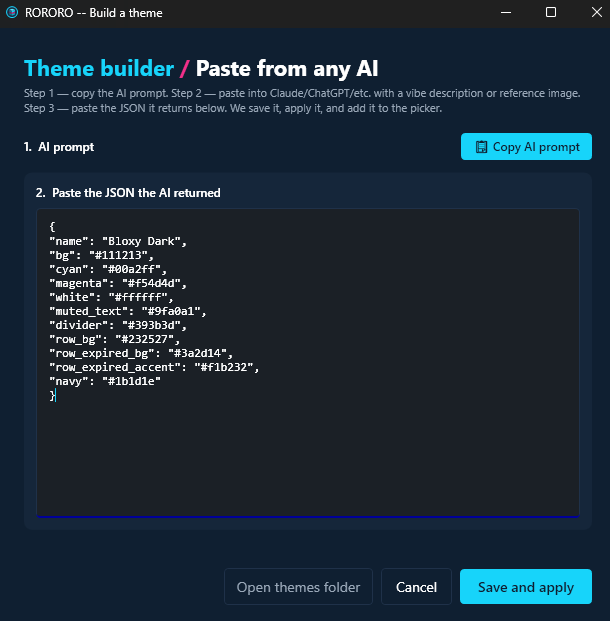
Four built in — cyan and magenta out of the box — plus a builder to tune every surface to taste and share the result as a file anyone can import.
Start with Windows + Discord Join
One startup toggle Windows stays in control of, and Discord Join links that start RORORO even when it's closed. Both work on Store installs too, not just direct downloads.
Roblox stays windowed
A crash or a stray Alt+Enter used to leave your next launch swallowing the whole screen. RORORO clears that saved fullscreen flag before every launch. On by default.
Speaks your language
The whole app — screens and messages alike — in French, German, Russian, Portuguese (Brazil), Polish, or Spanish. Follows your Windows language, or pick one in Settings and it switches instantly. The launch trailer below speaks all six too.
Alts that drop out come back
Turn on Rejoin if it drops out for any alt. When its Roblox window is open but it has been out of the game for 3 minutes — an idle kick, a failed join, a verification page — RORORO closes it and joins again. At most 3 rejoins an hour, your Stop always wins, and it never answers Roblox's verification page for you.
When it's Roblox, not RORORO
Known Roblox issues lists problems in Roblox itself: what happens, what to do, and a button to the RORORO feature that helps. A serious one gets a single notice. The list is signed and updates without an app update, and nothing about you is sent to fetch it.
See it work
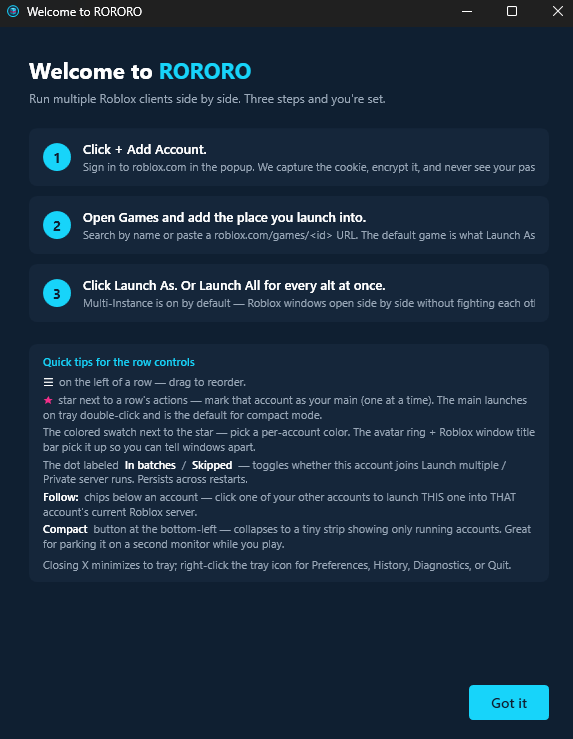
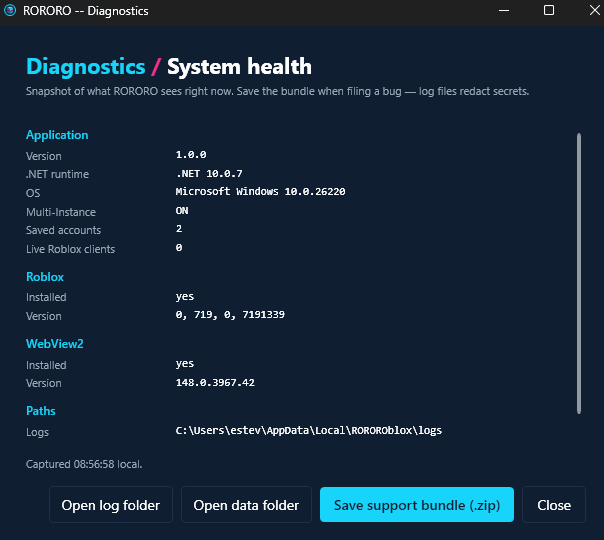
The surfaces you actually use — the welcome flow, the add-account window, Squad Launch, settings, the diagnostics tab.

Two platforms, one product
Not a port wrapped in a cross-platform runtime — each build is native to its OS, using only public APIs.
RORORO for Windows
- ▸Multi-instance via a singleton-mutex hold — typed P/Invokes, no client touch.
- ▸DPAPI-encrypted account vault — cookies tied to your Windows user; a copied file won't decrypt elsewhere.
- ▸Squad Launch, Friend Follow, join-by-link, private servers, per-game routing, local renames, and auto-rejoin for alts that drop out.
- ▸Presence + idle awareness per row, and streamer mode to disguise the roster on stream.
- ▸The plugin host — the named-pipe extension surface behind the Ur plugin family (see below).
- ▸Velopack auto-update · Microsoft Store + GitHub Releases · Windows 10 22H2 and up.
RORORO for Mac
- ▸Multi-instance via POSIX
sem_unlink+ per-launch app copy — public APIs only, no client modification. - ▸Keychain-backed vault — saved cookies never sync to iCloud.
- ▸Embedded WKWebView login — same password-never-touches-the-app contract as Windows.
- ▸A built-in auto-keys macro cycler for AFK keep-alive.
- ▸Sparkle auto-update · signed and notarized by Apple · Homebrew.
Plugins
v1.4 opened RORORO on Windows to plugins — browse them all on the plugin marketplace.
Session Stats
On the benchLive per-account uptime, launch counts this session, and mutex state — a pure observer panel for tracking a long farming run.
Discord Rich Presence
On the benchPushes "playing with N alts via RORORO" to your Discord status whenever accounts launch.
Auto-Relaunch on Exit
On the benchWatches for an alt's window closing and relaunches it — closes the crashed-alt loop on an unattended run.
- Open Plugins from RORORO's main-window nav, or from the tray menu.
- Paste the plugin's GitHub release directory URL into Install — the parent path that holds its
manifest.json,manifest.sha256, andplugin.zip. - RORORO fetches the manifest and verifies the SHA-256 of the download against it — and refuses to extract on any mismatch.
- Review the consent sheet. Every capability the plugin declared is itemized; toggle each one before it gets access.
- Restart RORORO. Plugins start when RORORO launches, so a fresh install runs after the restart prompt.
A plugin is your own signed Windows app built against the RORORO plugin contract. Ship it as a GitHub release with three artifacts — manifest.json, manifest.sha256, plugin.zip — and anyone can install it with the steps on the left.
The honest part
What this is, what the risk is, and whose work it builds on — said plainly, because it should be.
An independent third-party tool
RORORO is not affiliated with, endorsed by, or sponsored by Roblox Corporation. "Roblox" is a trademark of Roblox Corporation, used here only to describe compatibility — RORORO launches the official Roblox client, unmodified.
No injection — but the risk isn't zero
RORORO doesn't inject into or modify the Roblox client. It holds a Windows mutex name (or a POSIX semaphore on macOS) before launch, then starts the official client. Roblox has stated that multi-instancing "may be considered malicious behavior," so the risk of a ban appears low but is non-zero — and the README says exactly that. Don't run this on accounts you can't afford to lose.
Reuse without erasure
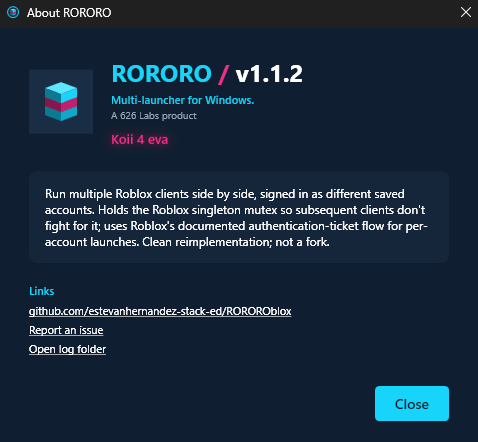
The named-mutex defeat technique originated with MultiBloxy by Zgoly. RORORO is a clean C# reimplementation with substantially expanded scope — account management, structured launch flow, a plugin host — not a fork. The credit, the reference binary, and the caveats are all in PROVENANCE.txt.
Where it ended up
Every Microsoft Store install since launch, plotted by country. Dot area is proportional to install count, so the long tail stays readable next to the United States.